![iFoodDS-Logo-Green-1.png]](https://info.ifoodds.com/hs-fs/hubfs/iFoodDS-Logo-Green-1.png?height=50&name=iFoodDS-Logo-Green-1.png)
When a customer invites your organization to connect with them in Trace Exchange, you can review the invitation and choose to Accept or Decline it.
What the invitation meansA customer network invitation means the customer is asking your organization to connect with them in Trace Exchange.
Once connected, your organizations can participate in supported Trace Exchange workflows, including sharing shipping records.
Reviewing an invitationWhen you receive an invitation:
- Log in to Trace Exchange.
- Open Your Customer Network.
- Locate the customer that invited your organization to connect.
- Select the invitation to review it.
You will have two options:
- Accept
- Decline
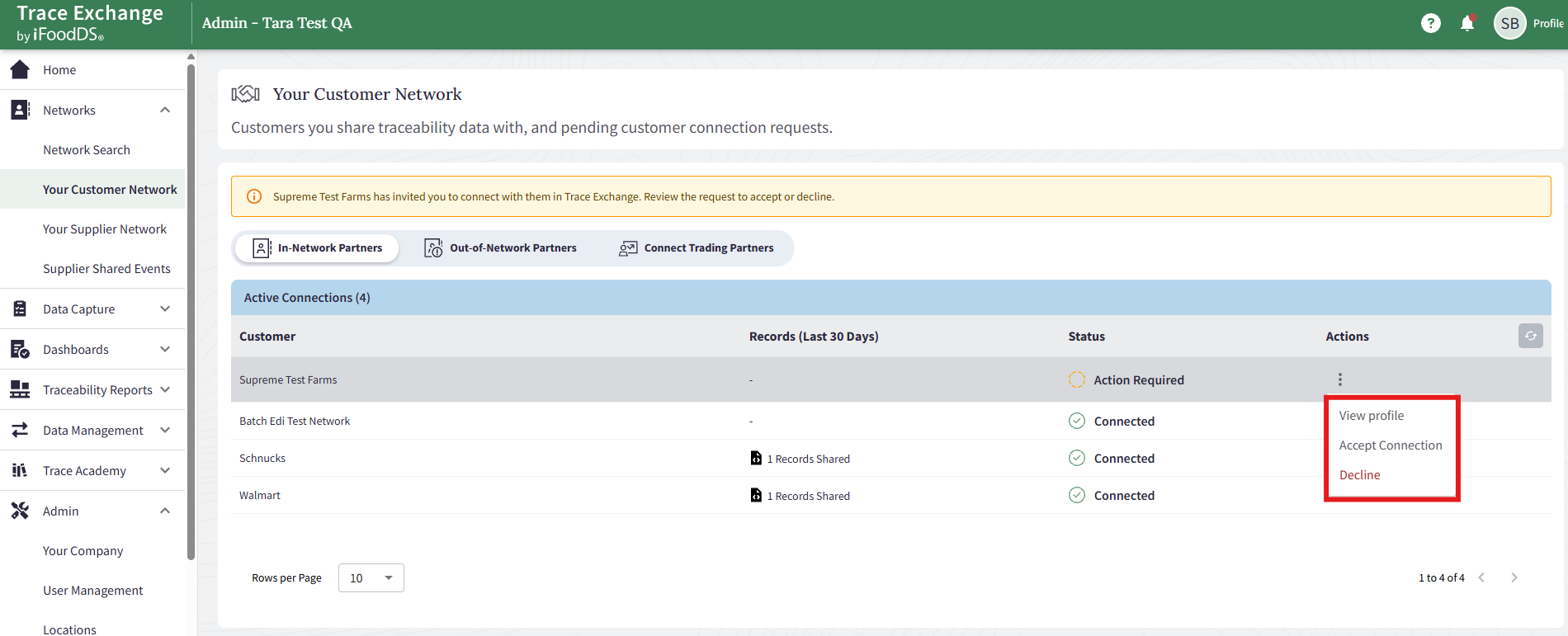
Select Accept if you want your organization to connect with the customer.
After you accept:
- The connection is established.
- The customer will appear as connected in Your Customer Network.
- Your organization can share shipping records with the customer through supported Trace Exchange workflows.
Select Decline if you do not want to connect with the customer.
After you decline:
- The connection is not established.
- The customer will not be able to receive shipping records from your organization through that connection.
- The invitation will show as declined.
If your organization receives invitations from multiple customers, each invitation can be reviewed and responded to separately.
You can accept some customer invitations and decline others based on your organization’s needs.